Here is a question and answer relating to Tech Tips #95 & #97 that we sent out earlier. Stay tuned for Tech Tip #100 coming soon!!
Hi Mark,
Just so I am clear and am not missing anything, InRoads must have the "DESC" (Attribute Name) in the point file in order to be run through the import process into the fieldbook, correct? Or is there a way to set it up to have InRoads automatically know the "DESC" Attribute Name and just import the file without setting up a new TIW file and selecting the Attribute Name and Value fields?
Can you just have it like "6611 1/2in RLS 26404"? Then the crews don't have to type in the Attribute Name in the point file. This works, I just don't want the crews to have to type in more than they need to.
- Mr. B

Here is the Zen Dude's response:
Hey Mr. B,
Yes, InRoads Survey must have a file format that identifies the Attribute Name, Attribute Value. Otherwise it doesn't know where to assign the value. There is no way that I know of to make InRoads Survey 'automatically' know the Attribute Name. The simplest thing to do would be to call the Attribute Name, 1. So the coding could be simplified to something like: 6611,1,1/2in RLS 26404
And with the Extended Description capability that I discussed earlier, the Attribute Name and Attribute Value can be carried from the Fieldbook to the Geometry and then out to any required reporting.
Now, collecting it as a Note is different.
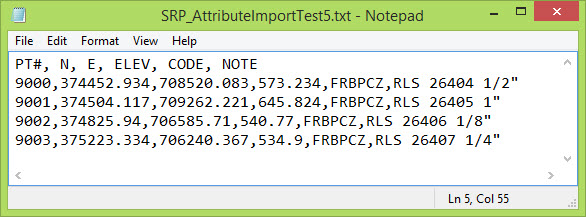
Collecting it as a Note doesn't require any Attribute Name to identify where it goes within the fieldbook entry structure. There is only one place that a Note goes.
The TIW would be set up to identify the text string after the Code (or wherever it is) as a Note.

In the Fieldbook it was placed in the Note area.

The '$(NOTES) syntax can be used to add Notes into the Custom Operations.
DX=7.5
DY=7.5
FT=23
JT=LC
CO=3
WT=1
'$(NOTES)PIPE
WT=0
CO=243
TX=2
DY=-1.5
'(Field Shot)
PR=4
DY=-1
'N $(NORTH)
DY=-1
'E $(EAST)
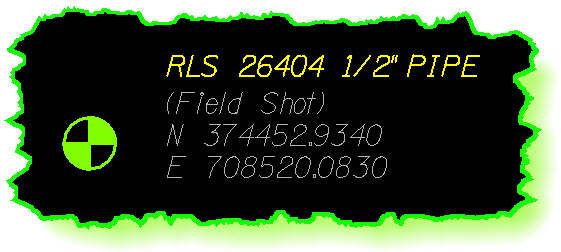
And because you'll probably ask me ; )
Yes, Notes can be added to the Geometry data in the Extended Description just like Attributes, and then reported on in the same way.
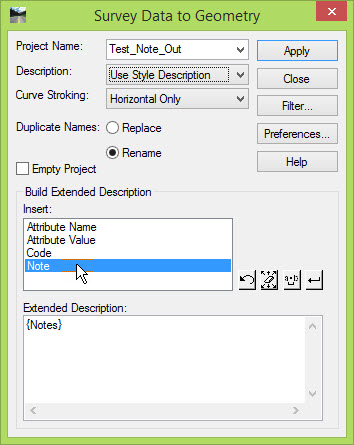
This might be more along the lines of what you want to do.
And if you have any more questions on this . . . please . . . keep them to yourself
; )
Civilly yours,
- zen
 Mark was great. Very Very knowledgeable on the subjects and really wanted the students to learn. He has a great personality but never got away from the subject at hand. Great person and instructor. Excellent !


